
CS2 contracts: trade cheap Counter-Strike 2 skins for one valuable skin
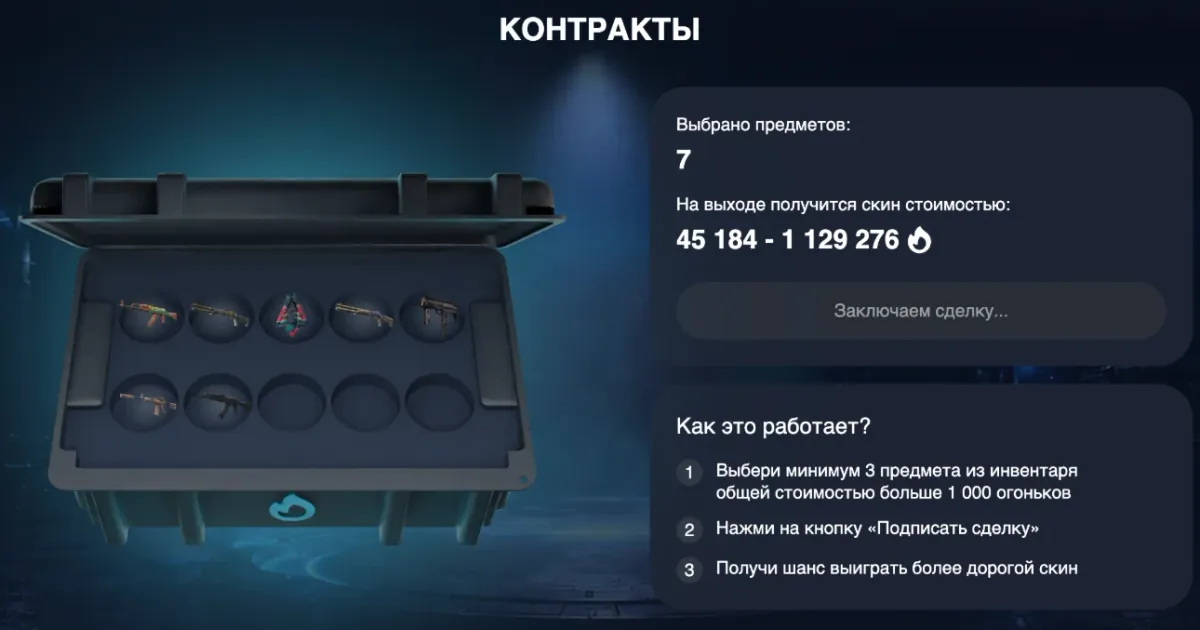
Contracts on Ezzz Skin turn several inexpensive CS2 skins into one item. Put 3 to 10 skins from your inventory worth over 1,000 flames in total into the contract, see the price range of the result and press “Sign the deal”.
Updated: October 9, 2026
Quick facts
- Where to play
- ezzzskin.com/contracts and the @ezzzskinbot Mini App
- Minimum
- 3 items
- Maximum
- 10 items (10 slots in the contract case)
- Total value
- Over 1,000 flames
- Shown before the deal
- The price range of the resulting skin
- Result
- One skin in your inventory — cash out to Steam or sell
What are contracts in CS2 and on Ezzz Skin
Counter-Strike 2 has a trade up contract: several skins of the same rarity are exchanged for one item of a higher rarity. To make it work you have to match rarity and collections and calculate the possible outcomes yourself.
Contracts on Ezzz Skin are simpler: what matters is the total value. You put at least 3 items from your inventory worth over 1,000 flames into the contract, and the site immediately shows the minimum and maximum price of the skin you will get.
Example from the screenshot: 7 skins in a contract give a result worth from 45,184 to 1,129,276 flames. After signing the deal you get one skin from that range.
How to make a CS2 contract on Ezzz Skin
Open Contracts
Go to the “Contracts” section on ezzzskin.com or in the @ezzzskinbot Mini App.
Select items
In the “Select items for the contract” block pick at least 3 skins from your inventory. Each skin takes a slot in the case — there are 10 slots.
Check the total
The total value must be over 1,000 flames. If it is not enough, the site tells you how many more flames worth of items to add.
Look at the range
The panel shows “Output skin will cost: from … to …” — the minimum and maximum price of the result.
Sign the deal
Press “Sign the deal” — while “Signing the deal…” is shown, the contract assembles your new skin.
Collect the skin
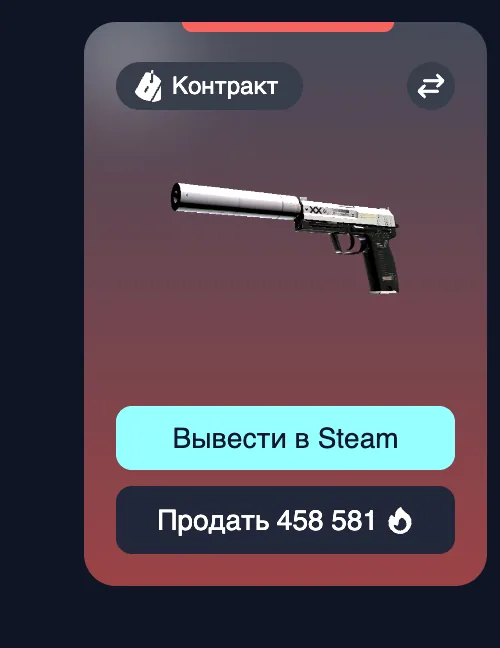
The item marked “Contract” appears in your inventory — cash it out to Steam or sell it for flames.
Ezzz Skin contracts vs CS2 trade up contracts
| Trade up contract in CS2 | Contract on Ezzz Skin | |
|---|---|---|
| Number of items | A fixed number of skins of the same rarity | From 3 to 10 skins from your inventory |
| Main condition | Same rarity and matching collections | Total value over 1,000 flames |
| Known in advance | Possible outcomes are calculated by hand or in calculators | The result price range is right on the screen |
| Where | In the game client | In the browser on ezzzskin.com and in Telegram |
| Result | A higher-rarity skin in your Steam inventory | One skin in the site inventory with Steam withdrawal |
Ezzz Skin contract features
From 3 items
No need to collect 10 identical skins — a contract starts with three.
Visible price range
Before signing you know the minimum and maximum value of the result.
Common loot into a top item
Turn cheap skins you would sell for pennies into one valuable item.
Hints
If the total is too low, the site tells you exactly how many flames worth of items to add.
Steam withdrawal
A skin from a contract is sent to Steam within 5 minutes after you confirm.
Contract tips
- Put cheap skins from cases into contracts instead of selling them for next to nothing. CS2 Cases →
- Check the range before signing: if the lower bound does not suit you, add or remove items.
- The result is random within the range — the maximum price is never guaranteed.
- You can stake the skin you get straight in the upgrader — combine modes. Upgrader →
- Only put in what you are ready to part with: items in a signed contract do not come back.
Cases, upgrader or contracts: which mode to choose
| Mode | What you put in | What you get | Risk |
|---|---|---|---|
| CS2 Cases | Flames (the case price) | A random skin from the case contents | Depends on the case: low, mid or high |
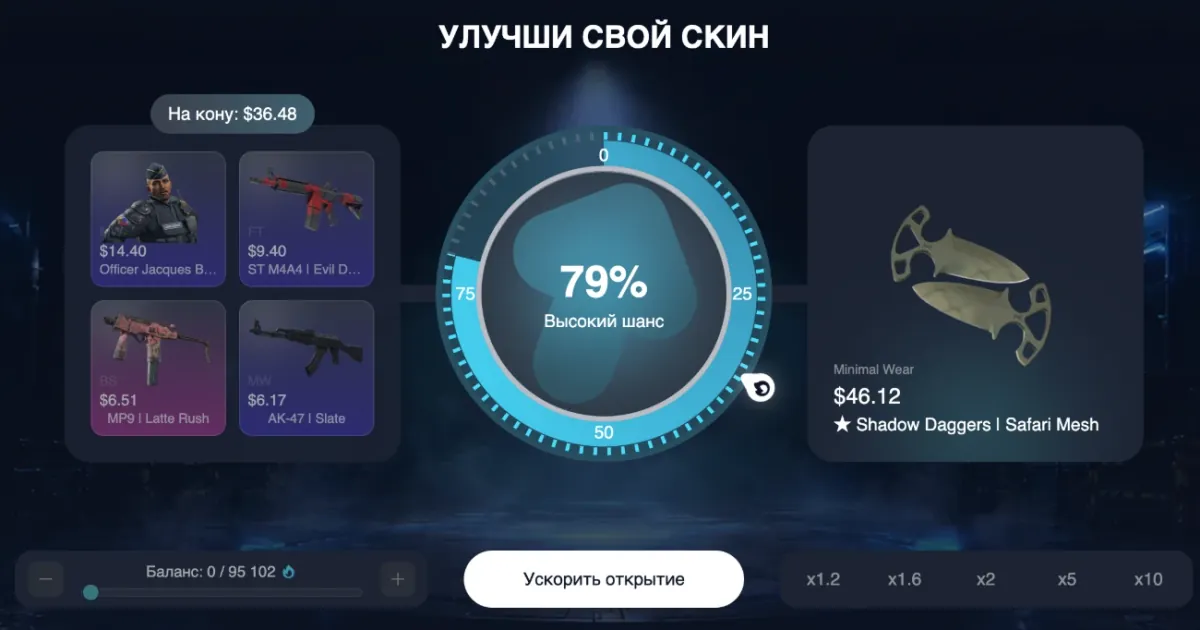
| Upgrader | Up to 4 skins + flames | The skin you picked — or nothing | You choose it: from x1.2 to x10 |
| Contracts | 3–10 skins worth over 1,000 flames | One skin within the shown price range | A skin is guaranteed, only its price varies |
FAQ
What are contracts in CS2?
It is a trade of several skins for one. In CS2 it is the trade up contract; on Ezzz Skin it is a mode where 3 or more skins worth over 1,000 flames in total turn into one item.
How many skins do I need for a contract?
At least 3 and at most 10 — one for each slot in the contract case.
What is the minimum contract value?
The total value of the selected items must be over 1,000 flames.
Can I know which skin I will get from a contract?
The exact skin is not known in advance, but before signing you see its price range — the minimum and maximum value.
How is a contract different from an upgrade?
In an upgrade you pick a specific skin and risk the stake for it. In a contract you always get a skin — only its price within the shown range varies.
Where can I make a CS2 contract online?
On ezzzskin.com/contracts or in the @ezzzskinbot Telegram bot via the Mini App.
Can I withdraw a contract skin to Steam?
Yes. A skin marked “Contract” is withdrawn with the “Cash out to Steam” button and arrives within 5 minutes after you confirm.
Other Ezzz Skin game modes
Play responsibly
Cases, upgrades and contracts are games of chance: the result of every round is random and does not depend on previous ones. Play for fun, set a limit in advance and never try to win back losses. Users under 18 may use the service only with the consent of their legal guardians.